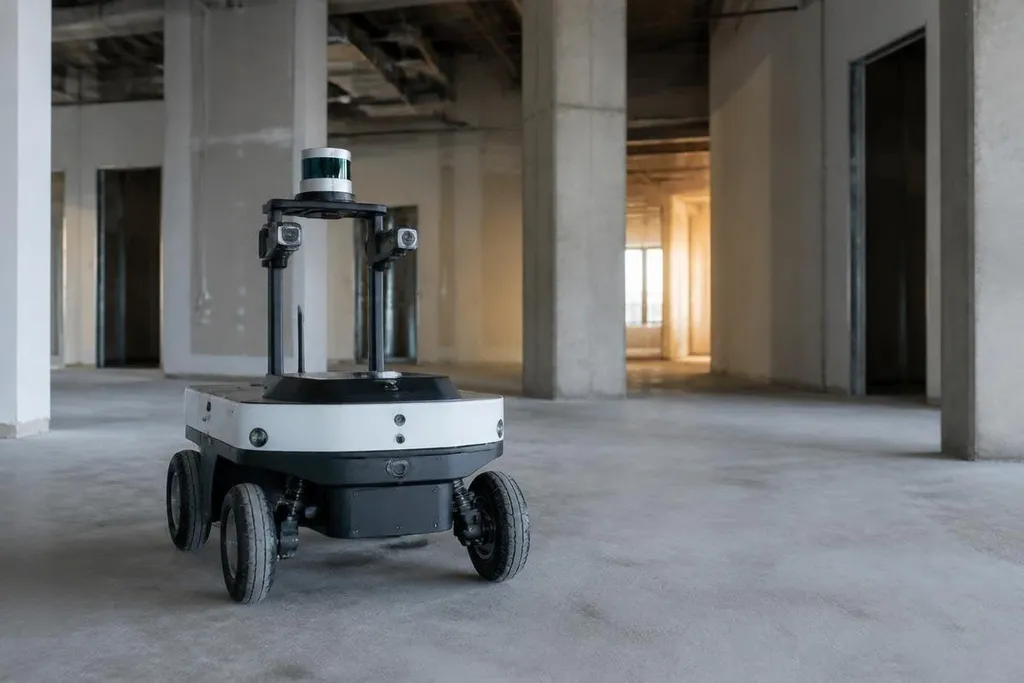
A mobile robot entering an unfamiliar building starts with no useful map. It must build one while working out where it is, using sensors, movement, and repeated checks against its surroundings.
- Sensors: LiDAR, cameras, wheel encoders, and inertial units collect different clues.
- Mapping: software turns those clues into a map of walls, objects, and open routes.
- Correction: the robot checks its position again when sensor errors build up.
The robot starts with sensor readings
One sensor reading can't locate the robot. LiDAR measures distance with laser pulses, cameras record visual details, wheel encoders count rotation, and an inertial measurement unit tracks changes in motion.
Each source has a weakness, so the robot compares them. Wheel slip can make the software think the robot moved farther than it did. A camera can lose track of a plain wall or a dark room. LiDAR can return poor readings from glass, shiny floors, smoke, or moving objects. Combining sensor data gives the robot more useful evidence than any one sensor can provide.
The robot also needs to know when a reading came from a fixed part of the building. A wall can help it locate itself. A person walking past cannot, because that person will be somewhere else a few seconds later.
Mapping and finding its position
Many mobile robots use simultaneous localization and mapping, or SLAM. The name describes two tasks that run together: the robot builds a map while estimating its own position inside that map.
As the robot moves, software links new sensor readings to earlier ones. A doorway seen from two positions can help estimate movement. A corner, shelf, or pillar can give the system a fixed reference. The map becomes more useful when the robot sees the same place again and checks whether its earlier estimate was wrong.
This check is called loop closure. If the robot returns to a room and its latest readings match the first visit, the software can reduce accumulated position error. Without that correction, a small error in each movement can spread across a long route and place the robot several meters from its real position.
The robot then plans a route through free space. It keeps a safety margin around walls and objects because its sensors and motors cannot place it at one exact point every time.
How robots handle change
A new place rarely stays still. People move, doors open, boxes arrive, and furniture shifts. The robot needs a map of the building, but it also needs a current view of what has changed.
Many systems keep a stable map for walls and other fixed structures while marking people, carts, and loose objects as temporary obstacles. That split helps the robot avoid treating a parked trolley as a permanent wall.
When the route ahead closes, the robot can pause, choose another path, or ask for help. Its response depends on the software and the job. A delivery robot may wait for a clear route. A warehouse robot may send a new route to a fleet system. An inspection robot may stop so an operator can check the area.
A map can show open floor while a parked cart or glass door changes the route. The robot must update its map as conditions shift, and old data can send it toward a blocked path. Robot 24 reports on the mapping and autonomy systems behind these choices, including the limits that appear when sensors miss part of a new place.
Where the method still fails
Navigation works best when the robot has clear sensor data and enough time to build a map. It gets harder in crowded spaces, poor lighting, repetitive corridors, open areas with few fixed features, and places where the floor changes under the wheels.
A robot can also build a map that is internally consistent but still wrong. A misplaced starting position, a blocked sensor, or a moving object can lead the software toward a false location. That is why new deployments often use marked routes, fixed reference points, remote monitoring, or a map made before the robot starts work.
I'd trust autonomous navigation after checking its recovery behavior, not after watching one clean demonstration. The useful test is what happens when a door closes, a person blocks the route, or the robot loses its position.
A practical check before deployment
Use this checklist before sending a robot into an unfamiliar site:
- Map the site: record walls, lifts, doors, restricted zones, and charging points.
- Test sensor limits: check glass, dark surfaces, bright light, dust, and narrow spaces.
- Add recovery points: mark places where the robot can stop and regain a known position.
- Watch moving traffic: run tests with people, carts, doors, and temporary obstacles.
- Set human help: define who receives an alert and how the robot returns to work.
- Measure repeat runs: compare route time, stops, position errors, and missed destinations.
A robot that reaches one destination is only at the start of the job. The deployment earns its place when the robot can repeat the route, report uncertainty, and recover from ordinary changes without hiding the problem.